
In Horses of Hoofprint Bay, changing a horse’s personality traits is as simple as editing your save file. Many players find themselves occasionally frustrated by their horses’ quirks, which can affect gameplay significantly. If you want to fine-tune traits or boost your in-game finances, knowing how to navigate the save files is essential.
This game gives you the power to not only shape your lineup of horses, but also helps you manage your in-game currency effectively. Just keep in mind: tinkering with your save file can come with some consequences.
Before diving in, it’s a good idea to back up your save file to avoid any mishaps. This little precaution can save you a lot of headaches in case things don’t go as planned!
How to Edit Horse Personalities in Horses of Hoofprint Bay Save Files
Editing a save file for Horses of Hoofprint Bay is pretty straightforward once you know the steps. You’ll want to locate your save file, open it in Notepad, and find the specific horse to modify. The corresponding personality values are housed within the same file as your money value, making it efficient to adjust both aspects.
Important Warnings Before Editing
Before making any alterations, consider these important points:
- Editing a save file disables achievements and statistics. If you plan to continue earning achievements, keep that file untouched.
- Backing up your save file is wise. Always save a backup before making changes to the game files.
- This guide focuses on editing existing personality traits only. Adding new quirks can lead to complications within the game and your save file.
While it might be tempting to add new traits by copying codes from horses with multiple traits, it’s generally wiser to stick to what you know. It’s just easier that way!
How to Find Your Save File
The first step is locating the Horses of Hoofprint Bay save folder. The quickest way I found is through the Windows search bar.
- Type %appdata% into the Windows taskbar search bar and hit Enter.
- In File Explorer, click AppData in the address bar to backtrack one folder.
- Open the LocalLow folder and scroll to locate ThogliStudios.
- Open Horses of Hoofprint Bay, followed by Saves~, then Games.
- Select the folder corresponding to the save game you wish to edit.
Alternative: Finding the Save Folder Manually
If searching isn’t your style, you can also navigate straight to the save folder using this path:
C:\Users\(your user)\AppData\LocalLow\ThogliStudios\Horses of Hoofprint Bay\Saves~\Games\(save file name)
Keep in mind that AppData is a hidden folder. If you can’t see it in File Explorer, go to View > Show > Hidden Items and enable that option.
How to Edit Horse Personality Traits
Inside your correct save folder, several JSON files await you. Look for the one named save as it corresponds to your current game (the rest are backups of prior gameplay).
Open this file up with Notepad or your preferred text editor.
Finding the Horse I Want to Edit
With the save file opened, hit Ctrl + F to search, and input the name of the horse you wish to modify. Press Enter to locate their information.
This will direct you to that specific horse’s details in the file. The personality segment is what you want to adjust.
Scroll through until you find the entry titled type. The number next to this is what you’ll edit.
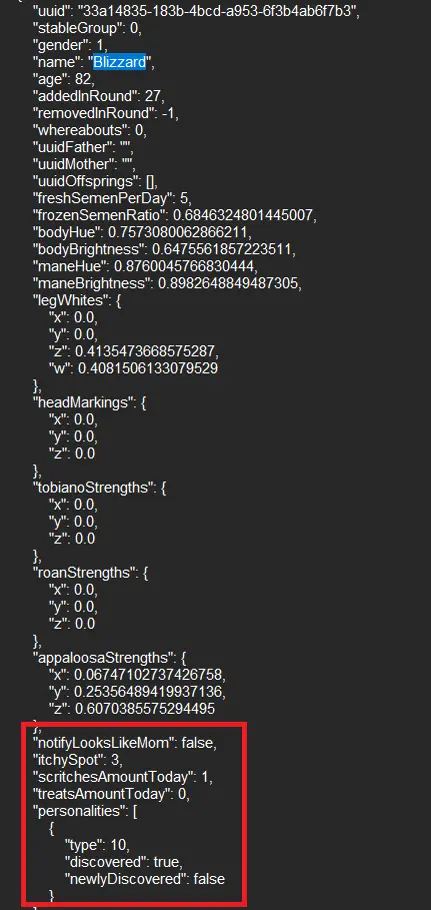
Understanding Horse Personality IDs
The personality IDs can be slightly confusing since they don’t match the positions in your in-game Traits and Quirks book directly. Keep in mind these numbers start at 0, not 1.
This means if you see a trait listed as 10th in-game, its save file ID would be 9. Getting that right is crucial to avoid selecting the wrong trait!
For reference, Good Inheritance appears as the 10th trait, but in the save file, the value is 9. Entering 10 would mistakenly select Bad Inheritance.
All Horse Personality IDs and Effects
Here’s a complete list of horse personality values for editing your save file:
- 0 – Easy Keeper: Needs less food, gains 10 body condition, and loses weight more slowly.
- 1 – Hard Keeper: Requires more food, loses 10 body condition, and loses weight faster.
- 2 – Snacky: Gains more confidence from treats.
- 3 – Cuddly: Gains more confidence from scritches.
- 4 – Neat Freak: Starts each day with less dirt.
- 5 – Mud Lover: Starts each day covered in more dirt.
- 6 – Sure Footed: Lower chance of injury and can only receive abrasions in the field.
- 7 – Injury Prone: Higher chance of injury, risking more serious injuries in the field.
- 8 – Good Mom: Foals from this mare start with better stats and confidence.
- 9 – Good Inheritance: Increases chance of foals having superior stats.
- 10 – Bad Inheritance: Likely to produce foals with inferior stats.
- 11 – Rebellious: Might randomly change gait at any confidence level.
- 12 – Energetic: Can speed up at max confidence and requires extra exercise.
- 13 – Chill: May slow down at max confidence and needs less exercise.
Note: Your starter horse always comes with Sure Footed and Good Mom. This selection minimizes injury risks early on and eases breeding challenges.
Saving the Personality Changes
Choose the desired personality, replacing the number next to type with the ID you identified.
After making the change, save the file and restart Horses of Hoofprint Bay. Your horse should reflect the new personality traits seamlessly.
Bonus: How to Edit Money in Horses of Hoofprint Bay
Since you’re already managing your save file, you can also adjust the amount of money available in the game.
Finding and Changing the Money Value
To edit your money value, follow these steps:
- Open the save file in Notepad and press Ctrl + F.
- Search for money and use the down arrow twice from the top.
- Locate the money value right below your yard or stable name.
- Change the existing number to your desired amount, typically by adding zeros.
- Save the file and relaunch the game to see your updated funds.
What Happens After Editing a Save File?
After implementing your changes and returning to the game, a red ribbon on the file selection screen will indicate that achievements and statistics are disabled for that save.
That’s an important trade-off to keep in mind. If earning achievements or tracking stats matters to you, editing that specific save file might not be the best idea.
And that’s how I adjust horse traits and manage money in Horses of Hoofprint Bay. Enjoy customizing your ranch!