Want to let your team know you are sneaking off to split-push? You can easily make your hero yell “I am going to Rat!” by configuring your chat wheel with the proper deadlock voice line guide shortcut. It is one of the funniest custom callouts in the game and instantly alerts your allies to your plans.
I got caught off guard the first time I heard Bebop scream this in the middle of a chaotic match. A lot of players completely overlook the communication settings and end up typing in chat while they should be escaping. Setting up quick callouts saves precious seconds when the enemy team is hunting you down.
Before you queue into your next match, take thirty seconds in the main menu to customize your radial menu. Here is how to unlock the funniest tactical communication tool in the game.
You can find this specific callout tucked away inside your communication options. Once you bind it to an active slot, triggering it in-game is as simple as pressing your default middle mouse button.
How to Add Going to Rat to the Chat Wheel
Setting this up only takes a moment in the game menus. Follow these quick steps to get the voice line ready for your next match.
- Open the main Settings menu in Deadlock.
- Navigate to the Communication tab.
- Click on any empty slot on your Chat Wheel.
- Open the drop-down menu containing all available callouts.
- Scroll down until you locate Going to Rat!
- Select it to lock the voice line into your chosen slot.
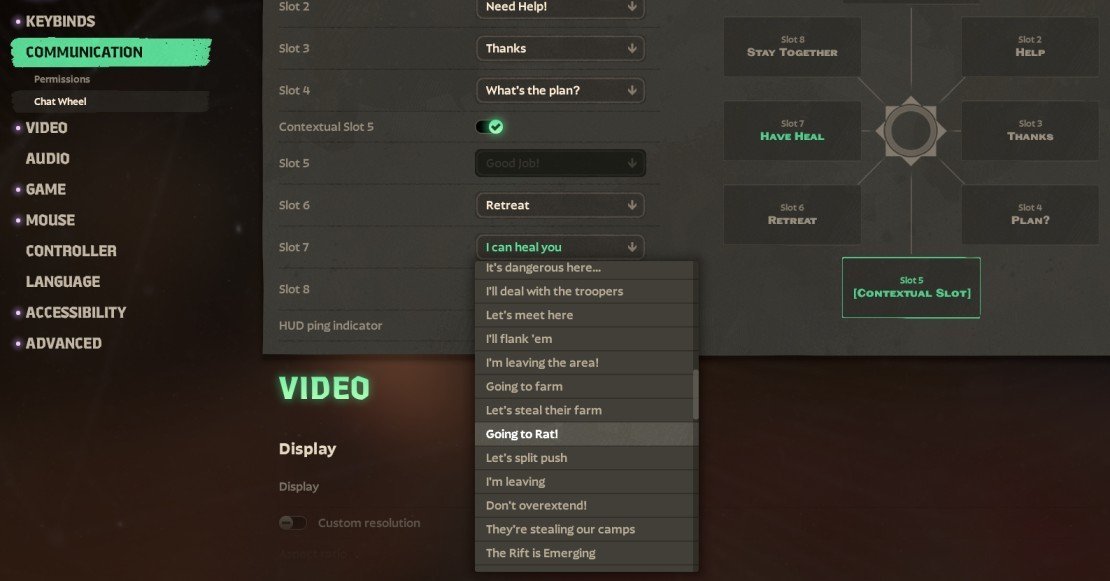
Do not worry about which specific slot you pick. Any of them will work perfectly fine, so just put it somewhere that feels natural to swipe toward in a hurry.
How to Use the I’m Gonna Rat Voice Line
With the callout assigned, you are ready to use it during live matches. It takes less than a second to trigger once you get the muscle memory down.
Simply hold down the middle mouse button during a match to bring up the wheel overlay. Flick your cursor over the Going to Rat! option and let go of the button to shout the line.
The cool part is that the line is fully voiced by whichever hero you are playing at the time. Characters deliver the line with their own unique personality and voice actor, which makes it incredibly entertaining to test on different heroes.
Does Every Character Have a Rat Voice Line
Almost every hero in the roster has a custom-recorded version of this line. However, because the game is still actively changing, a few exceptions pop up from time to time as voice assets get updated.
For instance, Sinclair currently lacks the updated recording for this line. If you are playing a character who does not have it yet, the wheel might just display the text without playing any audio.
Can You Spam the Rat Voice Line
If you were planning on driving your teammates crazy by spamming this constantly, you are out of luck. The game protects players’ sanity by putting a strict cooldown on the chat wheel.
Trying to trigger it repeatedly in rapid succession will result in a brief lock. Use it sparingly when you are actually making a move, rather than treating it like a spam button.
At its core, the line is a fun but genuinely useful tool to warn your allies. It lets them know you are breaking away to apply pressure somewhere else on the map.
What Does Ratting Mean in Deadlock
In competitive MOBAs, ratting refers to the strategy of avoiding major team fights to push objectives. Instead of joining a dangerous clash in the mid lane, you sneak off to destroy undefended structures.
For example, while your team is keeping the enemy busy at a bottleneck, you might quietly push a side lane to knock down a Guardian. It is high-risk but can easily swing a losing match in your favor.
Make sure to tell your team you are doing it so they do not engage in a bad four-versus-five fight thinking you are right behind them. Personally, I love using this right before a major team fight breaks out so my squad knows to play defensively while I slip past the enemy lines.